


Designed for recruiters and talent sourcers, this LinkedIn People Search scraper extracts clean, structured profiles from any search results page—including profile URL, name, connection level, headline, location, and mutual connections—so you can quickly build qualified candidate pipelines, prioritize warm connections, and export to Google Sheets, Airtable, or your ATS. Maintained by Bardeen for reliable, up-to-date performance across global LinkedIn searches.
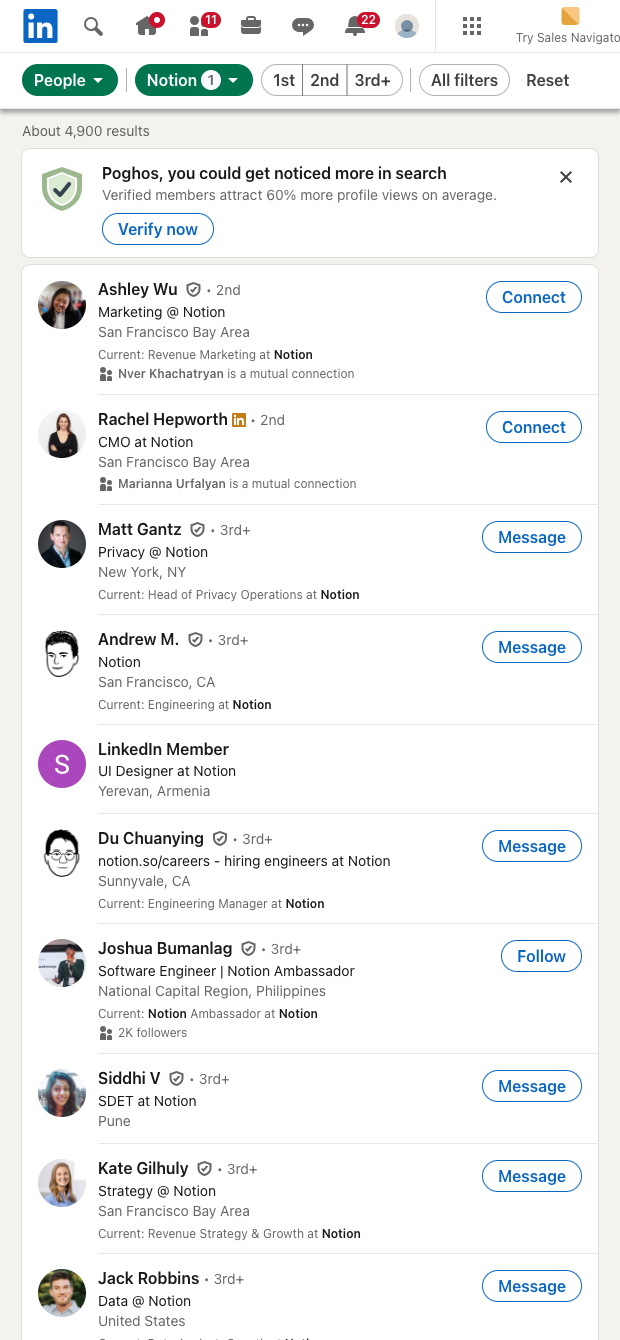

Who it’s for: Talent sourcers, recruiters, and HR teams who rely on LinkedIn to identify and prioritize candidates worldwide. This template turns any LinkedIn people search into a structured table with profile URL, name, connection level, headline, location, and mutual connections—ideal for building shortlists from company filters, keyword searches, or geography-based queries.
How it helps: Instantly capture search results into a spreadsheet or ATS-ready table, then use Bardeen to enrich and transform the data—classify seniority from headlines with AI, score candidates by connection proximity, segment by location, and summarize profiles for faster screening. Create repeatable sourcing workflows that deduplicate profiles, keep notes, and sync updates to destinations like Google Sheets, Airtable, or Notion for collaboration with hiring managers.
Quality you can trust: This scraper template is built, maintained, and proactively updated by Bardeen to adapt to LinkedIn changes and deliver accurate, high-quality data for your sourcing workflows.
With Bardeen, you can do much more than just web scraping. After extracting data from any website, use Bardeen’s powerful automation tools to validate and enrich your data, run additional scrapers on linked pages, or leverage AI to qualify leads and generate content automatically. Once your data is ready, you can easily export it to CSV, Google Sheets, Airtable, or Notion for further analysis and reporting.






SOC 2 Type II, GDPR and CASA Tier 2 and 3 certified — so you can automate with confidence at any scale.










