


Email personalization is a powerful strategy to boost customer engagement and conversion rates. HubSpot's email marketing software provides robust features like personalization tokens and smart content that integrate seamlessly with its CRM. In this step-by-step guide, we'll show you how to effectively use these tools to create highly targeted and personalized email campaigns that resonate with your audience.
Email personalization is crucial for boosting customer engagement and conversion rates. By tailoring your messages with AI assistance to individual recipients, you can create more relevant and compelling content that resonates with your audience. HubSpot's email marketing software offers a range of powerful personalization features that seamlessly integrate with its CRM capabilities.
Two key concepts in HubSpot's email personalization toolkit are:

By leveraging these tools, you can craft highly targeted and personalized email campaigns that drive better results. HubSpot's email marketing software provides a comprehensive set of personalization features, including default and custom contact properties, conditional logic, and A/B testing, giving you the flexibility to create truly tailored experiences for your audience.
Personalization tokens are powerful tools that allow you to insert recipient-specific information into your emails, creating a more personalized and engaging experience for your audience. Here's a step-by-step guide on how to use personalization tokens in HubSpot:

Setting default values for tokens is crucial to ensure that all emails are personalized correctly, even when specific data is missing. This prevents awkward gaps or blank spaces in your emails when a contact's information is incomplete.
For a more seamless email personalization experience, consider using Bardeen's AI assistance. It can help you draft personalized emails for HubSpot contacts quickly.
Advanced token usage includes conditional personalization based on user behavior or purchase history. For example, you can display different content or offers based on a contact's past interactions with your website or products. This level of personalization helps create a more tailored and relevant experience for each recipient, leading to higher engagement and conversion rates through automation.
Smart content is a powerful feature that allows you to dynamically change the content of your emails based on the viewer's characteristics and interactions. By using smart content, you can create highly targeted and personalized email campaigns that resonate with your audience.
To set up smart rules in HubSpot emails, follow these steps:
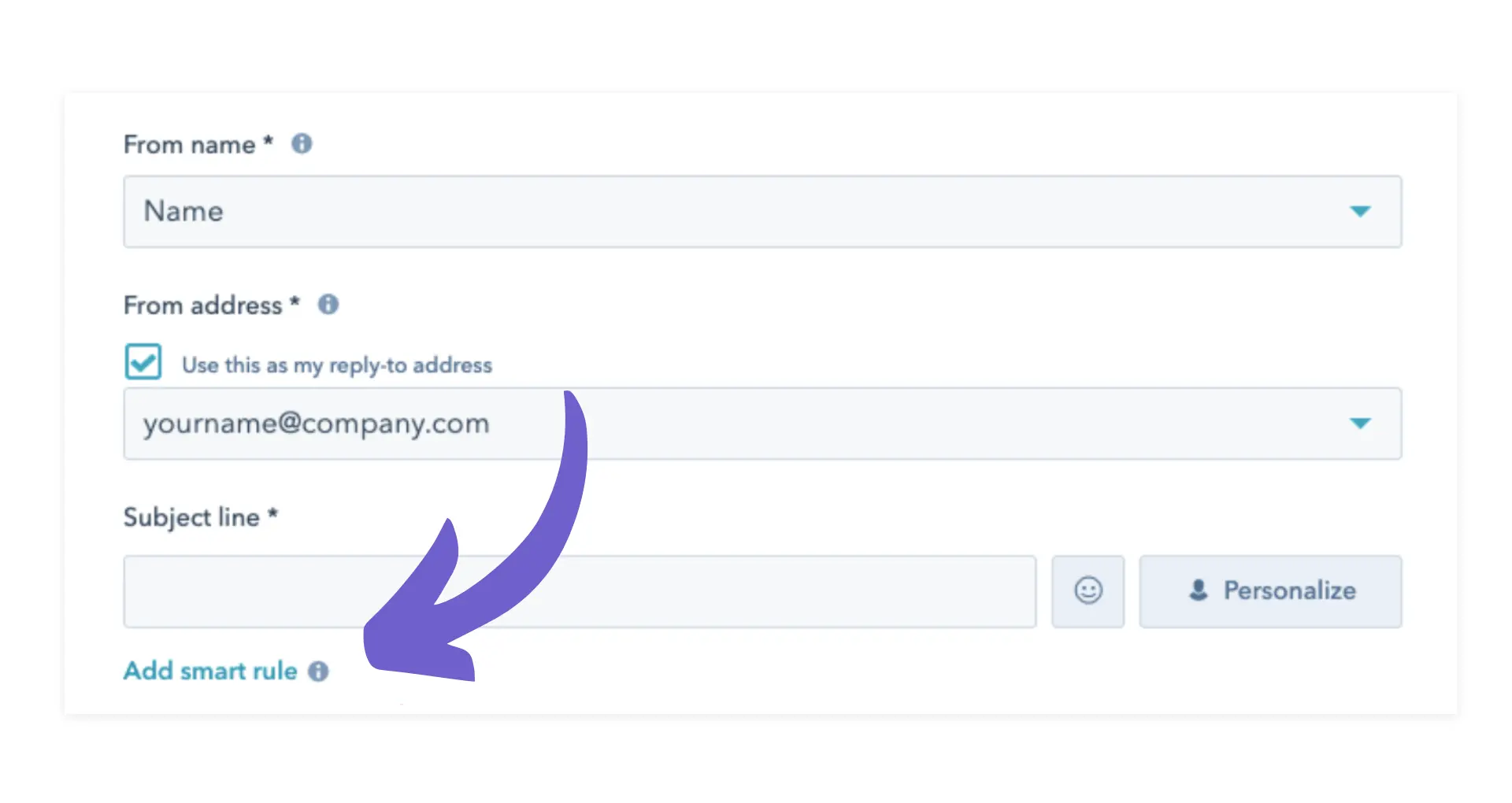
For example, you can create smart rules based on a contact's lifecycle stage. Show different content to leads, marketing qualified leads, and customers, tailoring your message to their specific needs and interests. You can also segment your audience based on their engagement levels, such as showing special offers to highly engaged contacts while providing educational content to less engaged ones.
By implementing smart content in your emails, you can improve the relevance and engagement of your email campaigns. Personalized content leads to higher open rates, click-through rates, and ultimately, better conversion rates. Smart content helps you deliver the right message to the right person at the right time, enhancing the overall effectiveness of your email marketing strategy.
HubSpot offers a wide range of email templates that you can customize to fit your marketing strategies and goals. To select and customize an email template, follow these steps:

When customizing your email templates, consider the following tips:
To further optimize your email templates, take advantage of HubSpot's A/B testing features. Create multiple versions of your template with different subject lines, content, or designs, and send them to a sample of your audience. HubSpot will automatically determine the winning version based on your chosen metrics, such as open rates or click-through rates.
By continually testing and refining your email templates, you can identify what resonates best with your audience and improve the overall performance of your email marketing campaigns. Streamline your email workflow with AI-powered automation for even better results.
Stay focused on important tasks by using Bardeen's AI assistance to draft personalized emails quickly.








SOC 2 Type II, GDPR and CASA Tier 2 and 3 certified — so you can automate with confidence at any scale.









