


Export LinkedIn Sales Navigator people search and list results into a clean table for fast B2B prospecting. Ideal for SDRs, AEs, RevOps, business development, and recruiters worldwide, this template captures name, title, company, location, profile and Sales Navigator URLs, connection level, headline, time in role, skills, languages, education, and more. Use Bardeen to enrich, score, segment, summarize with AI, and send prospects to Google Sheets, Airtable, Notion, HubSpot, or Salesforce. Maintained by Bardeen for reliable, up-to-date scraping.
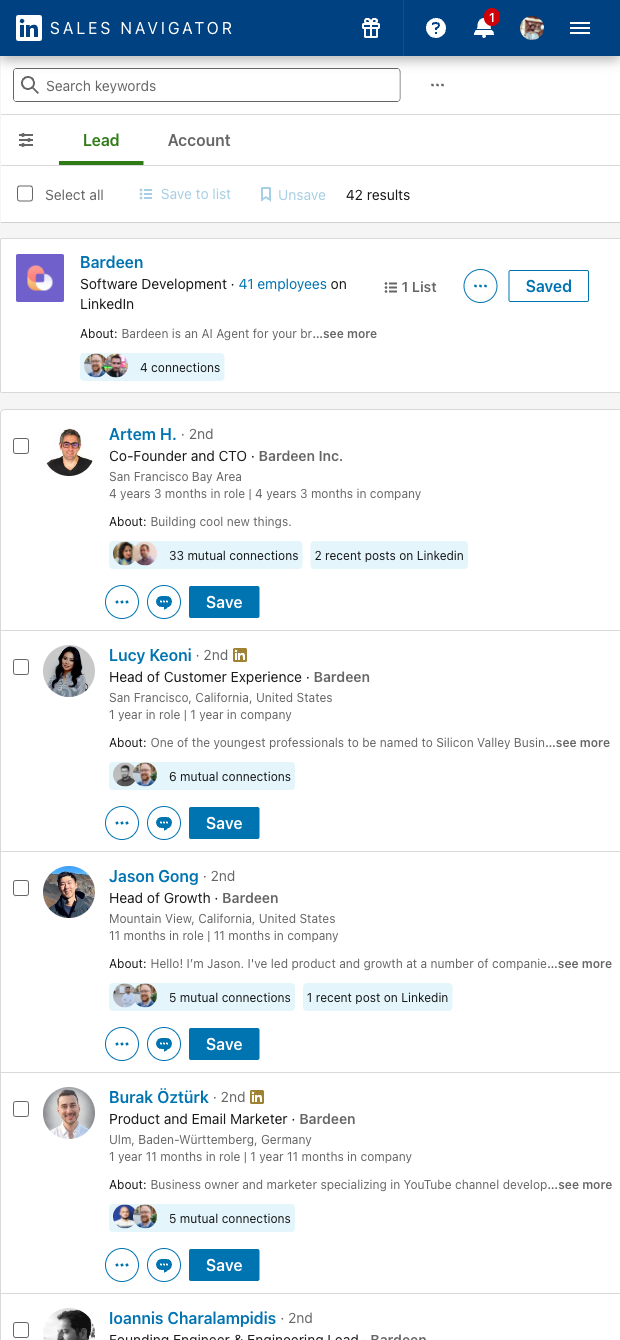

Who it’s for: B2B sales teams (SDRs, AEs, BDRs, RevOps, founders) and recruiters who rely on LinkedIn Sales Navigator to discover and qualify prospects globally. This LinkedIn Sales Navigator people list scraper pulls structured data from search and lists, including name, position, company, profile and Sales Navigator URLs, connection level, location, headline, time in role, current company details, education, degree, graduation year, skills, languages, and profile images—perfect for building precise ICP segments and personalization at scale.
How you’ll use it: Instantly turn any Sales Navigator results page into a tabular dataset for lead generation, ABM targeting, territory planning, or recruiting shortlists. Qualify prospects with time in role, skills, and languages, segment by connection level and location, and personalize outreach with headline and about fields. With the Bardeen extension, you can enrich with firmographics, score and route leads, de-duplicate against your CRM, ask AI to summarize profiles or draft first lines, and export to Google Sheets, Airtable, Notion, HubSpot, Salesforce, or CSV.
Quality you can trust: This template is built and maintained by Bardeen. We routinely update it to reflect LinkedIn Sales Navigator changes, ensuring dependable, high-quality data capture for your workflows.
With Bardeen, you can do much more than just web scraping. After extracting data from any website, use Bardeen’s powerful automation tools to validate and enrich your data, run additional scrapers on linked pages, or leverage AI to qualify leads and generate content automatically. Once your data is ready, you can easily export it to CSV, Google Sheets, Airtable, or Notion for further analysis and reporting.






SOC 2 Type II, GDPR and CASA Tier 2 and 3 certified — so you can automate with confidence at any scale.







