


Extract Google Maps search results into a clean table with business name, rating, reviews, category, location, preview image, and profile URL—perfect for local lead generation, SEO audits, and competitive research. Quickly export to Google Sheets, Airtable, Notion, or your CRM to keep prospect lists and market analyses current, globally.
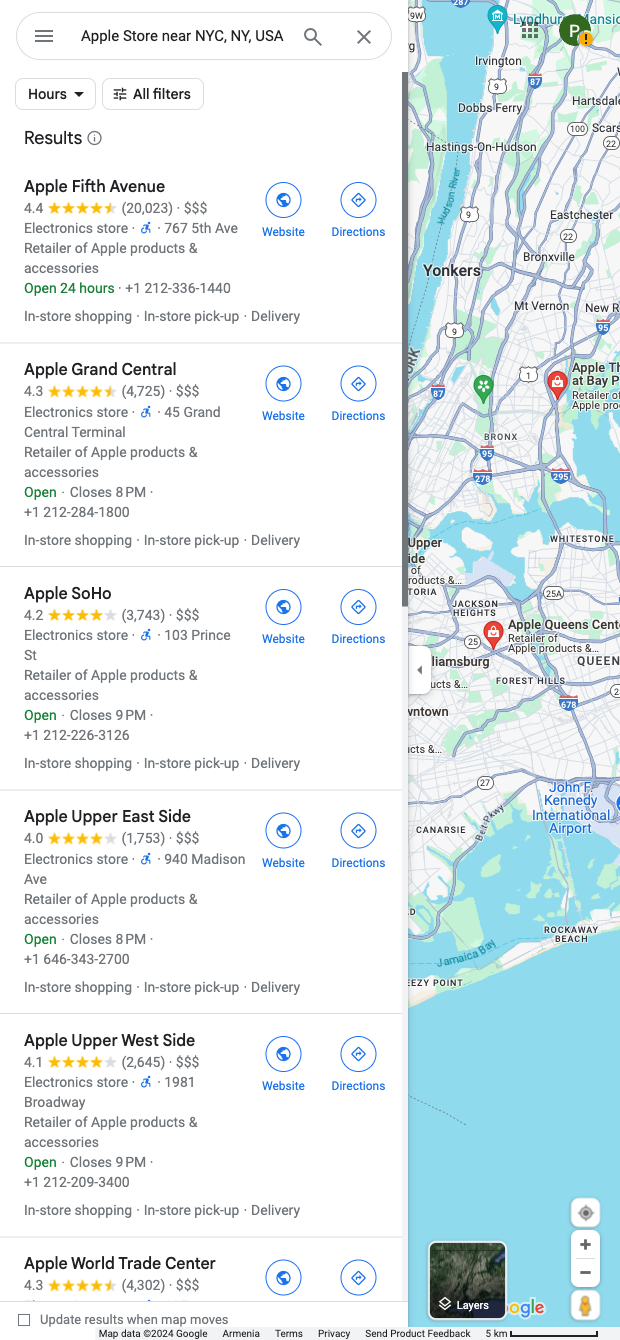

Who it's for: Sales development reps, local SEO specialists, and growth marketers who rely on accurate local business data. Run this template on any Google Maps search (e.g., “Apple Store near NYC”) to capture business listings at scale and build targeted lead lists or competitor inventories across any city or region worldwide.
How you’ll use it: Pull names, ratings, review counts, categories, locations, images, and profile URLs into a structured table, then use Bardeen to enrich each record (visit websites, extract contact details, and company info), score and segment by rating/reviews, summarize key insights with AI, and route the results to Sheets, Airtable, Notion, or your CRM. Typical workflows include prioritizing outreach by rating/review thresholds, clustering competitors by neighborhood or category, and generating quick summaries of market coverage for territory planning.
This template is maintained and updated by Bardeen to keep pace with Google Maps UI changes, ensuring reliable, high-quality data extraction.
With Bardeen, you can do much more than just web scraping. After extracting data from any website, use Bardeen’s powerful automation tools to validate and enrich your data, run additional scrapers on linked pages, or leverage AI to qualify leads and generate content automatically. Once your data is ready, you can easily export it to CSV, Google Sheets, Airtable, or Notion for further analysis and reporting.






SOC 2 Type II, GDPR and CASA Tier 2 and 3 certified — so you can automate with confidence at any scale.








