Automation Assistant Beta: Everything you need to know
Bardeen Announcements
Published on
October 21, 2025
TL;DR
Automation Assistant creates hyper-personalized workflows for you while you work. This week, we're rolling out invites to the Beta.
In this post, we'll outline helpful information to set you up to use the feature and some information on how it all works. Here are a few links to help you find what you're looking for:
Turning Automation Assistant ON
Joining the Beta
Turning Automation Assistant OFF
How it works
Privacy and security
What's next for the feature
Why did we build Automation Assistant?
Our vision has always been to make automation more powerful but also more accessible. Accessible means creating automated workflows should be as simple as possible. We started with the builder, a no-code sandbox where you assemble sequences of actions. The builder quickly evolved into the Magic Box, where automations are built fully with natural language - our team was the first to launch this.
Automation Assistant is the next evolution of building automations that's purely proactive.
That means Bardeen will build and present hyper-personalized automations to you. All you have to do is turn it on.
How to turn on Automation Assistant
By default, Automation Assistant is enabled for all users who are a part of the Beta.
Starting this week, we'll roll out access to all our users in batches. Once in the Beta, you will receive occasional emails with workflows built by Automation Assistant. They look like this:
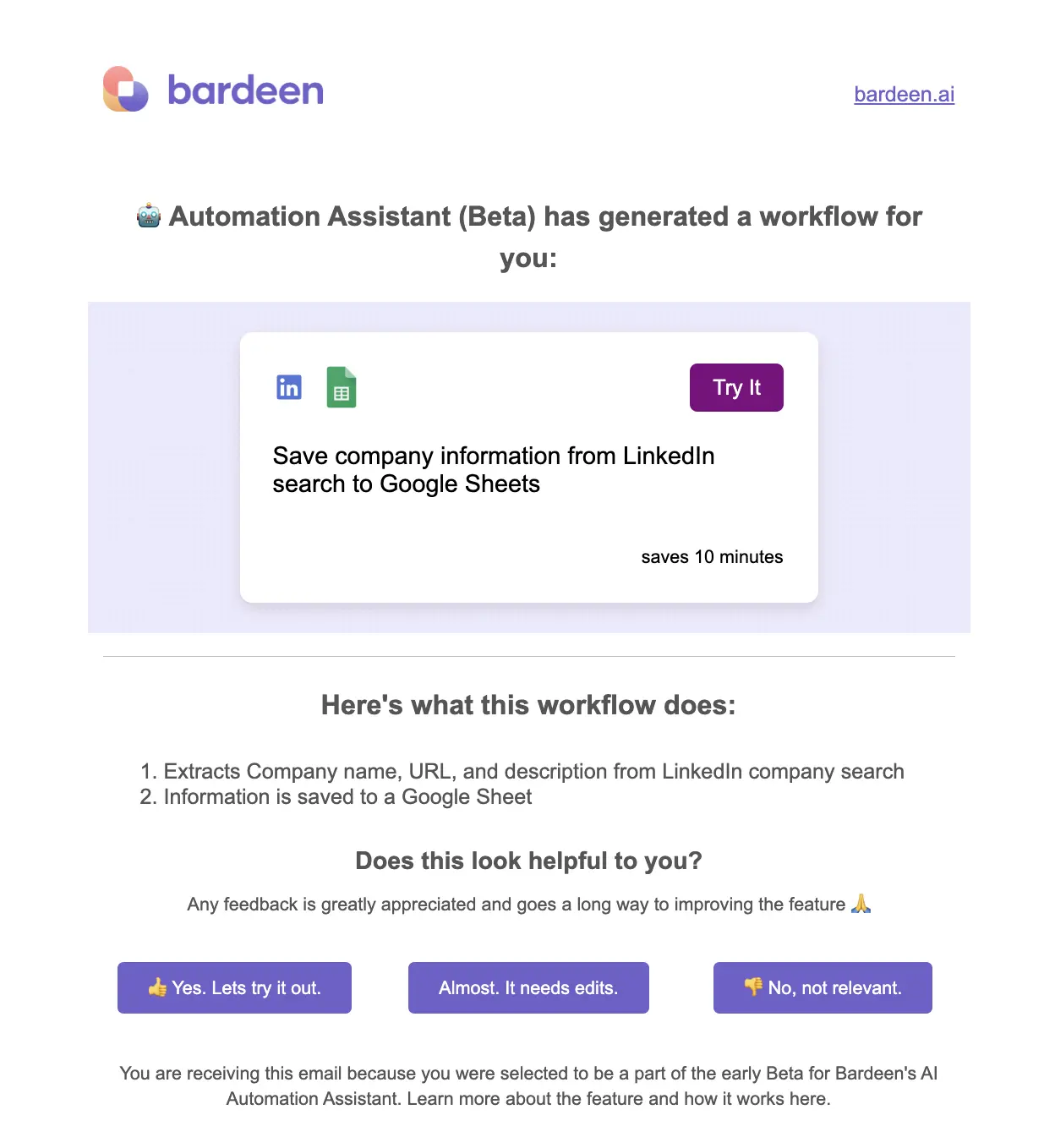
Please give us feedback! It goes a long way.
You can request to join the Beta here if you do not have access.
How to turn off Automation Assistant
You can turn off Automation Assistant in the Bardeen app by toggling off Quick Suggestions and Daily Suggestions.
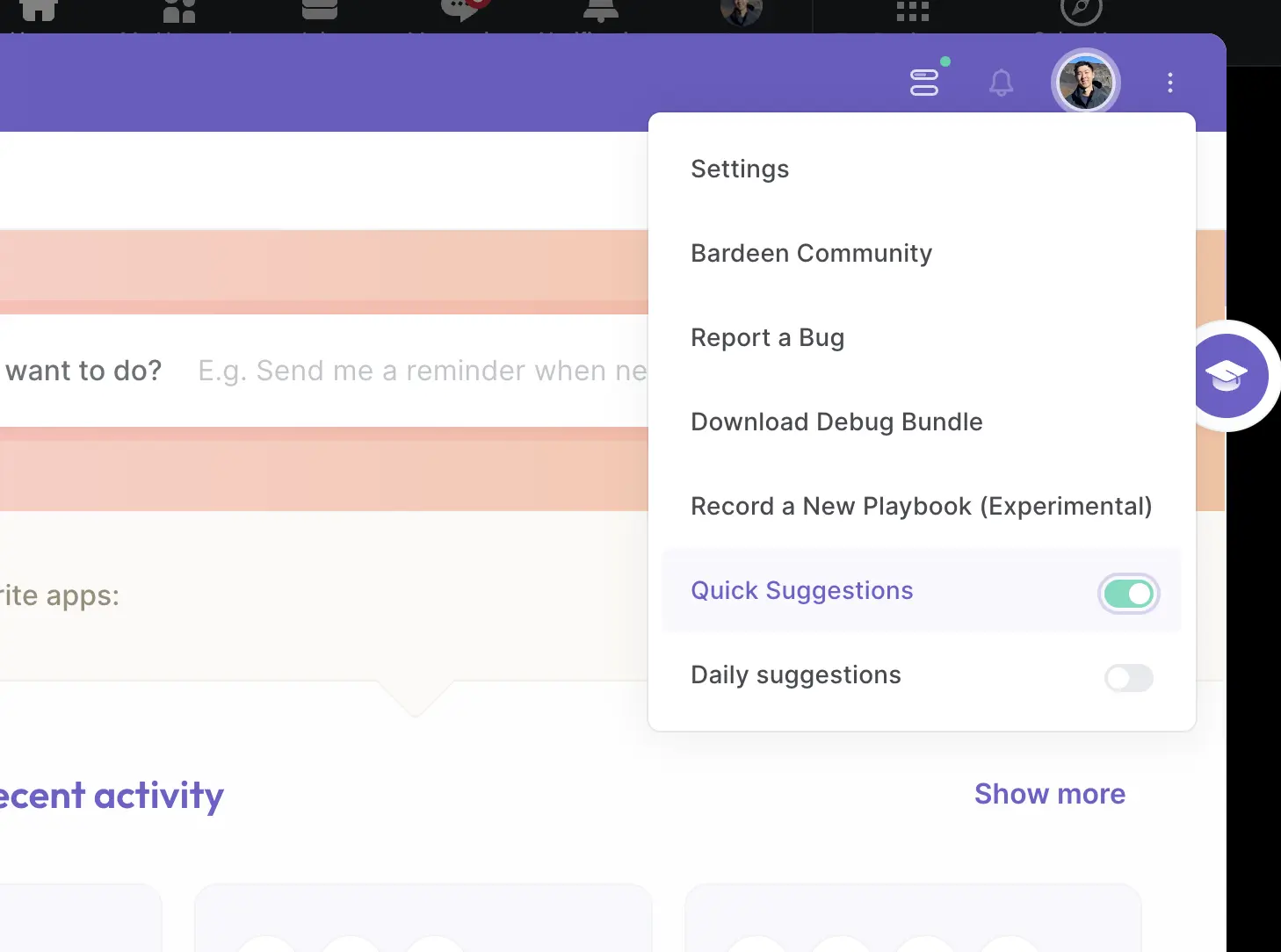
You can also click Turn off Automation Assistant suggestions in the footer of emails you receive from Bardeen.
How Automation Assistant works
AI is often a magical experience, but trusting it to automate our work also means understanding how it works (and where it doesn't). What you see is a personalized workflow in your inbox, but before that, there are a few things that happen in the background:
With all sensitive personal information removed, Bardeen's browser extension observes your actions and finds patterns it can automate.
Bardeen uses AI to map your task to a sequence of actions Bardeen can perform. It then uses the Magic Box to construct a workflow.
Bardeen automatically scores the workflow for quality and relevance. We add workflows likely to save you time and deliver value to a queue.
We notify you of the workflow built by the Automation Assistant via email.
We gather feedback on the automation provided. This information is used to improve future workflows created by the Automation Assistant.
For a deeper dive into the technical aspects of Bardeen's technology, take a look at our research page.
Privacy and security
You entrust us with your information when you utilize Bardeen's products, including the Automation Assistant. We understand the importance of this trust and are committed to treating your information with the utmost care and respect.
Below is a highlight of how Bardeen handles your information and how we aim to be secure, reliable, and private:
You control your data: You have full control over where Bardeen works, the data it has access to, and can turn it off when you want.
Personal information never leaves your browser: We remove all sensitive information in actions Automation Assistant observes to create automations. We do as much as possible without data leaving your machine - this is why Bardeen is a Chrome extension.
We do not sell your data, nor do we plan to. Our business model relies on offering a free version of our product, with the option for you to upgrade to paid versions. This is how we generate revenue.
Data is encrypted, private, and secure. Bardeen's team goes to great lengths to ensure all data is securely stored and least privileged access is enforced.
If you have questions, reach out to privacy@bardeen.ai. You can also read our full Privacy Policy here.
What's next for Automation Assistant?
In this early phase, our goal is to rapidly improve the quality and relevance of automations built by Automation Assistant.
In this early phase, we will rapidly improve the quality and relevance of automations built by Automation Assistant. Your feedback during this phase is critical in helping us do this.
Next, we will bring these generated automations to where you work, your browser. Sure, emails work, but our goal is to save you time before you spend all day repetitively doing a task we can automate.
If this interests you, the best way to stay up to date is to create a Bardeen account. You can do that here.
SOC 2 Type II, GDPR and CASA Tier 2 and 3 certified — so you can automate with confidence at any scale.
Frequently asked questions
What is Bardeen?
Bardeen is an automation and workflow platform designed to help GTM teams eliminate manual tasks and streamline processes. It connects and integrates with your favorite tools, enabling you to automate repetitive workflows, manage data across systems, and enhance collaboration.
What tools does Bardeen replace for me?
Bardeen acts as a bridge to enhance and automate workflows. It can reduce your reliance on tools focused on data entry and CRM updating, lead generation and outreach, reporting and analytics, and communication and follow-ups.
Who benefits the most from using Bardeen?
Bardeen is ideal for GTM teams across various roles including Sales (SDRs, AEs), Customer Success (CSMs), Revenue Operations, Sales Engineering, and Sales Leadership.
How does Bardeen integrate with existing tools and systems?
Bardeen integrates broadly with CRMs, communication platforms, lead generation tools, project and task management tools, and customer success tools. These integrations connect workflows and ensure data flows smoothly across systems.
What are common use cases I can accomplish with Bardeen?
Bardeen supports a wide variety of use cases across different teams, such as:
Sales: Automating lead discovery, enrichment and outreach sequences. Tracking account activity and nurturing target accounts.
Customer Success: Preparing for customer meetings, analyzing engagement metrics, and managing renewals.
Revenue Operations: Monitoring lead status, ensuring data accuracy, and generating detailed activity summaries.
Sales Leadership: Creating competitive analysis reports, monitoring pipeline health, and generating daily/weekly team performance summaries.






