


Scrape Google Travel hotel search results to capture hotel name, price, rating, reviews, image, and listing URL in a structured table—perfect for hotel revenue managers, travel marketers, and travel agencies to benchmark competitor rates, monitor market trends, and build curated hotel lists worldwide. Export to Google Sheets, Airtable, or Notion with a reliable, Bardeen‑maintained template.
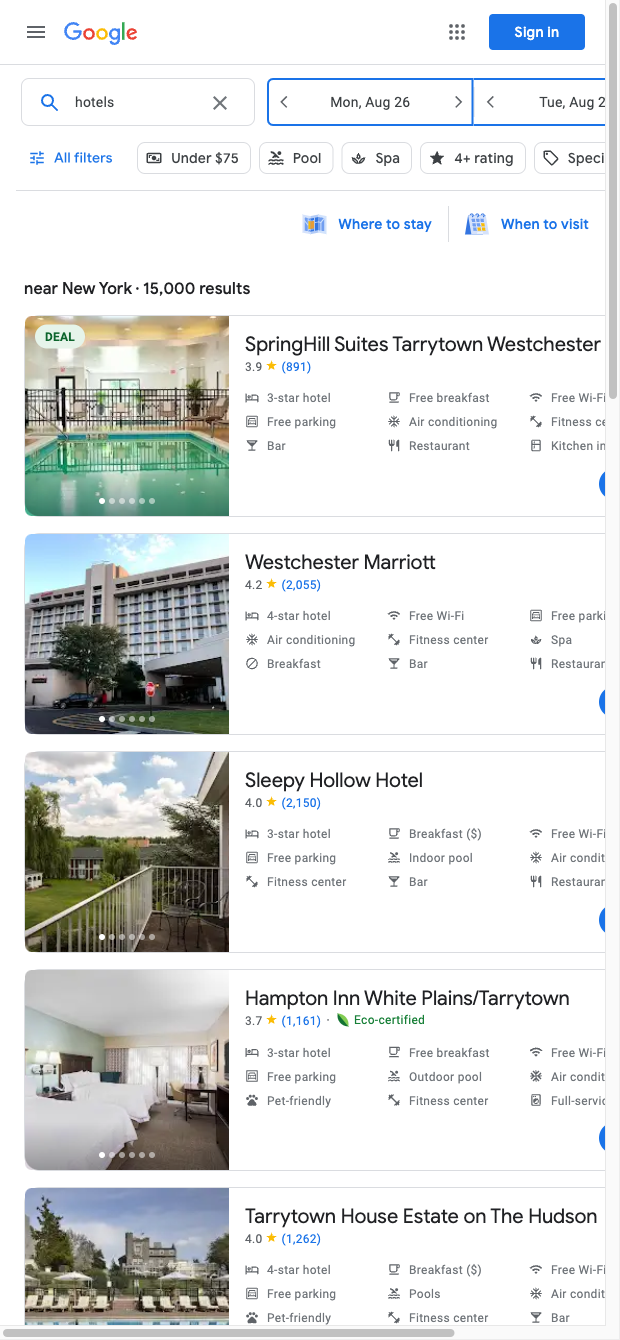

This Google Travel hotel scraper template is designed for hospitality professionals—revenue and distribution managers, e‑commerce teams, travel agencies/OTAs, and corporate travel buyers. It extracts Name, URL, Price, Rating, Reviews, and Image from search results so you can benchmark competitor pricing, surface top‑rated properties, assemble destination‑specific hotel lists, and track market changes across any city or date range globally.
After scraping, Bardeen lets you enrich and act on the data: compute average and median prices, segment by price tiers, flag hotels with rating ≥ 4.5 and 500+ reviews, generate AI summaries of top picks, and de‑duplicate entries. Then export to Google Sheets, Airtable, or Notion, or trigger follow‑ups in your CRM. Many teams schedule refreshes to compare day‑over‑day price shifts, monitor competitors, and get alerts when rates change.
Maintained by Bardeen: this template is actively monitored and updated to reflect Google Travel changes, ensuring reliable, high‑quality hotel pricing and rating data.
With Bardeen, you can do much more than just web scraping. After extracting data from any website, use Bardeen’s powerful automation tools to validate and enrich your data, run additional scrapers on linked pages, or leverage AI to qualify leads and generate content automatically. Once your data is ready, you can easily export it to CSV, Google Sheets, Airtable, or Notion for further analysis and reporting.






SOC 2 Type II, GDPR and CASA Tier 2 and 3 certified — so you can automate with confidence at any scale.







