


Extract AppSumo product listings into a clean table—including product name, category, description, discount/original price, rating, reviews, links, and images—so founders, marketers, agencies, and procurement teams can compare lifetime deals, track discounts, and export to Google Sheets, Airtable, or Notion.
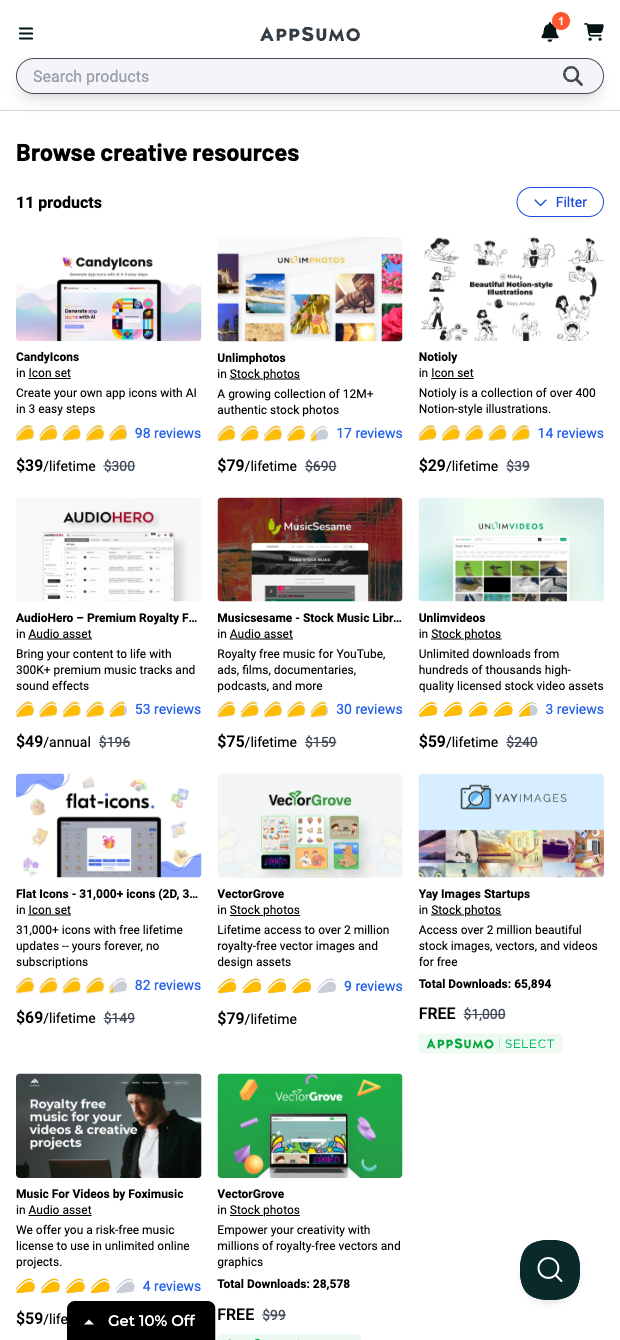

This template is ideal for professionals who evaluate and buy software and digital assets—startup founders, growth marketers, agencies, and SMB buyers—who want a fast, structured view of AppSumo deals. Run it on any AppSumo category or collection page (like Creative Resources) to capture product name, category and link, description, discount and original price, rating, review count and link, plus the product image. It’s great for building shortlists, benchmarking alternatives, and monitoring market trends globally across AppSumo’s marketplace.
Use Bardeen to turn this data into decisions: enrich records with vendor sites or LinkedIn, summarize review feedback with AI, compute savings and value scores, rank by rating or discount, and export to Google Sheets, Airtable, or Notion. You can schedule runs to track new or changing deals, send Slack alerts for price drops, and de-duplicate against your current tool stack—making procurement faster and more consistent.
Maintained by Bardeen: this high-quality scraper is regularly updated to reflect AppSumo site changes, ensuring reliable, accurate data for your workflows.
With Bardeen, you can do much more than just web scraping. After extracting data from any website, use Bardeen’s powerful automation tools to validate and enrich your data, run additional scrapers on linked pages, or leverage AI to qualify leads and generate content automatically. Once your data is ready, you can easily export it to CSV, Google Sheets, Airtable, or Notion for further analysis and reporting.






SOC 2 Type II, GDPR and CASA Tier 2 and 3 certified — so you can automate with confidence at any scale.







